[pytest.mark.xxx
")
Setup and Teardown with Fixtures
1. 安装 pytest
pip install pytest
2. 编写代码和测试用例
假设我们有一个简单的 Python 文件 calculator.py,其中包含一些基本的算术操作函数:
现在,我们在另一个文件中编写这些函数的测试用例。创建一个名为
test_calculator.py的文件:# test_calculator.py import pytest from calculator import add, subtract, multiply, divide # 使用 @pytest.fixture 定义一个夹具 @pytest.fixture def sample_data(): return [1, 2, 3] # 使用 @pytest.mark.parametrize 参数化测试 @pytest.mark.parametrize("a, b, expected", [ (3, 4, 7), (-1, 1, 0), (-1, -1, -2), ]) def test_add(a, b, expected): assert add(a, b) == expected # 使用 @pytest.mark.skip 跳过测试 @pytest.mark.skip(reason="This feature is not implemented yet") def test_feature_not_implemented(): assert False # 使用 @pytest.mark.skipif 有条件地跳过测试 @pytest.mark.skipif(pytest.__version__ < "6.0", reason="Requires pytest 6.0 or higher") def test_pytest_version(): assert True # 使用 @pytest.mark.xfail 标记预期会失败的测试 @pytest.mark.xfail(reason="This test is expected to fail") def test_expected_failure(): assert False # 使用 setup 和 teardown 夹具 @pytest.fixture def resource_setup_teardown(): resource = "resource" yield resource print("Teardown") def test_resource(resource_setup_teardown): assert resource_setup_teardown == "resource" # 使用 @pytest.mark.timeout 设置超时时间 @pytest.mark.timeout(1) def test_timeout(): import time time.sleep(0.5) # Should pass # time.sleep(2) # Uncomment this line to see timeout in action # 使用 @pytest.mark.usefixtures 在类级别应用夹具 @pytest.mark.usefixtures("sample_data") class TestClass: def test_method_1(self, sample_data): assert sum(sample_data) == 6 def test_method_2(self, sample_data): assert len(sample_data) == 3 # 基本的测试方法 def test_subtract(): assert subtract(10, 5) == 5 assert subtract(-1, 1) == -2 assert subtract(-1, -1) == 0 def test_multiply(): assert multiply(3, 4) == 12 assert multiply(-1, 1) == -1 assert multiply(-1, -1) == 1 def test_divide(): assert divide(10, 2) == 5 assert divide(-1, 1) == -1 assert divide(-1, -1) == 1 with pytest.raises(ValueError): divide(10, 0)3. 执行测试
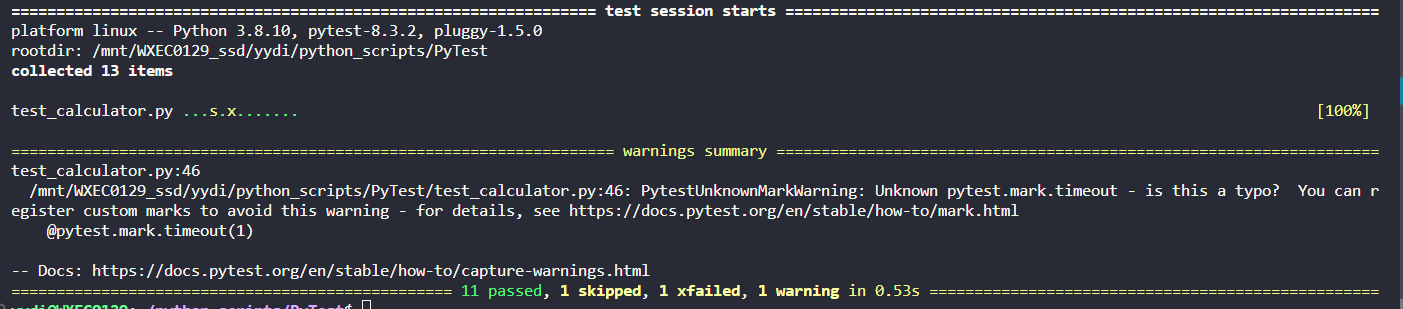
pytest4. 查看测试结果
No comments yet.